
Mapping Munchies
My wife and I run a blog where we review the restaurants we go to when we go out for dinner on Friday evenings.
And on this website you can look at all the reviews, but it is a bit difficult to see as to where the restaurants are.
So I decided that I wanted to add a map to our website.
We have already recorded the addresses for this, but not quite yet the coordinates.
So in order to show a map we needed to convert the addresses to coordinates, and there are several ways of doing so.
You can roll something yourself with a Nominatim, which is part of the OpenStreetMap project. But I decided to try a different service, called OpenCageData, which provides a geocoding service. I didn't want to maintain a geocoder myself.
After signing up and creating API keys, I used their PHP library (handily recommended during the on boarding process) to convert all my addresses to latitude/longitude pairs. This required a bit of fiddling, as it was fairly picky about what it would accept. Although we mostly go to places in London, it really didn't like geocoding places with "The Netherlands" as address, and instead insisted on my using "Netherlands". I updated the source material to cope with this.
With the finicky bits out of the way, I changed my blog's software to add a coordinate pair whenever it sees a new entry and address. But to start, I had to go through all of the reviews of restaurants that we already had, and pass their addresses through the geocoder:
<?php
$geocoder = new \OpenCage\Geocoder\Geocoder($OpenCageKey);

$location = "{$entry['title']}, {$entry['location']}";
$geocoded = $geocoder->geocode( $location );

if ( count( $geocoded['results'] ) > 1 )
{
  foreach ( $geocoded['results'] as $result )
  {
    if ( $result['components']['_category'] === 'commerce' )
    {
      $finalResult = $result;
    }
  }
}
Of course, for that to work, you need to have the $OpenCageKey set to your API key.
The geocoder then gives me a coordinate pair in latitude and longitude. Often there are multiple results. Although each result has a confidence level attached to it, the result for just the postcode is higher than the actual accurate point of interest for the restaurant, even though I also pass in its name as part of the $location.
Because of this, is have to loop over the results and pick the right one (with lower confidence level), if an actual commerce place, indicating a restaurant, was found.
I store these pairs in the database, and then I can use them for generating a map with all the restaurants that we have reviewed.
After I had created these coordinate pairs, upon a page load, my blog software creates a big GeoJSON file with all the features. I embed this into my rendered web page to prevent extra round-trips to the server. I wouldn't suggest to do this if the data updates frequently, or if you have a lot of locations to display.
An example of the generated code looks like, after formatting it for easy viewing:
var geojsonFeatures = [
  {
    "type":"Feature",
    "properties": {
      "name": "Spicy Grill",
      "rating": "4",
      "popupContent":
        "<h3><a href=\"\/spicy-grill-jkb\">Spicy Grill<\/a> <small style=\"font-weight: normal\">(Rating: 4)<\/small><\/h3>"
        "<p>122 Golders Green Road, London NW11 8HB<\/p>"
        "<small>Starters: \u00a33.00-\u00a37.50<br\/>Mains: \u00a39.50-\u00a313.50<\/small>"
    },
    "geometry": {
      "type": "Point",
      "coordinates": [-0.2007587,51.5739245]
    }
  },
  …
];
I then use a JavaScript library called Leaflet, a library that I've used many times for many of my other side projects to render these restaurants on the map. The code for this is fairly simple too.
The id="map" div is where Leaflet renders the map, which you create in JavaScript with:
<div id="map" style="height: 500px; align: center;"></div>
I then configure the OpenStreetMap map layer URL, attribution, and some configuration options for Leaflet:
<script type="text/javascript">
var map = new L.Map('map', {zoomControl: false});
var osmUrl = 'https://{s}.tile.openstreetmap.org/{z}/{x}/{y}.png',
osmAttribution = 'Map data © 2025 <a href="https://openstreetmap.org">OpenStreetMap</a> contributors',
osm = new L.TileLayer(osmUrl, {maxZoom: 18, attribution: osmAttribution});
I also created a specific icon instead of relying on the standard marker for points:
var forks = L.icon({
  iconUrl: '/images/meal.svg',
  iconSize: [ 24, 24 ],
});
And include the GeoJson blog from earlier:
var geojsonFeatures = …
And bind the GeoJSON data layer to the map, with the data (geojsonFeatures), a conversion layer (pointToLayer) to add the markers, set the title with the feature's properties.name, add a pop-up for each feature (onEachFeature), and then add the layer to the map with addTo(map):
L.geoJSON(
  geojsonFeatures, {
  pointToLayer: function(feature, latlng) {
    return L.marker(latlng, {
      icon: forks,
      riseOnHover: true,
      title: feature.properties.name
    });
  },
  onEachFeature: function(feature, layer) {
    layer.bindPopup(feature.properties.popupContent)
  }
}).addTo(map);
I then center the map to a strategic location in London, and add the osm layer to the map with addLayer:
  map.setView(new L.LatLng(51.513, -0.177), 13).addLayer(osm);
</script>
Finally I add the map to the div element map by instantiating L.Map, and prevent zoom controls from showing:
var map = new L.Map('map', {zoomControl: false});
To see the full code, you can do "view source" on the page that shows our mapped restaurants.
When you click on an icon, you get a pop up with the title and a link to the review, with some useful information such as our rating, the address, and a cost indication:
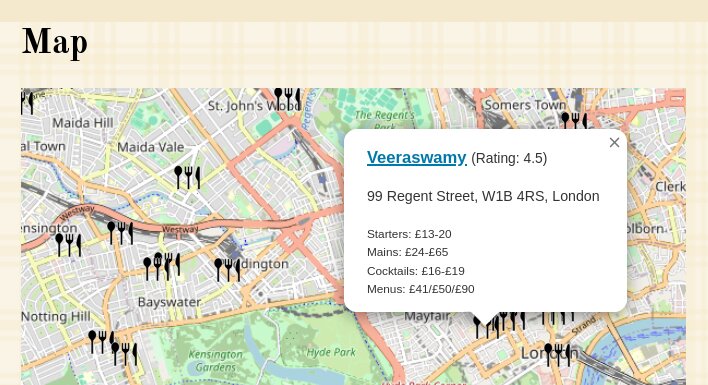
This actually didn't take me a lot of time to do, but mostly because I'm always relatively familiar with Leaflet.
I enjoyed working on this project to add a map to the website.
And when I now look at it, I can see all the lovely places, and sometimes less lovely places where we had our Friday night dinners. If you zoom out far enough, you can also see the far away places we enjoyed our meals at. Let us know if you make it to one of them!

Likes
Comments
@blog It seems it's better to read this article on Geocoding with @opencage and putting our @fridaynightdinners reviews, on my normal website, instead of on Mastodon. I need to fix my script to escape the HTML chars in the code examples!


Life Line
Updated a cafe
Specify street/place names to addresses
Specify bicycle parking capacities
Specify bicycle parking fees
Specify bicycle parking access
Specify whether crosswalks have tactile paving
Specify width of opening
Specify whether pitches are lit
Specify pitch surfaces
Specify whether pedestrian crossings have markings
Specify step counts
Survey tactile paving on steps
Specify whether steps have a ramp
Specify which way leads up for steps
Specify whether pedestrian crossings have islands
Specify whether pedestrian crossings have traffic signals
Determine roads lane count
Specify whether roads have lane markings
Survey if places still exist
Specify whether roads have sidewalks
Survey postbox collection times
Survey opening hours
Determine whether ATM allows depositing cash
Specify bicycle parkings covers
Shortlink
This article has a short URL available: https://drck.me/fndmap-jki