
XFCE and moving windows around with the keyboard
During a recent apt-get update && apt-get dist-upgrade I suddenly found myself with the horrors that are Gnome 3 and the Gnome shell, and of course, at the least opportune moment when I was actually planning on heading into an office (more about that later). I've always been a big Sawfish fan, and was annoyed when Gnome replaced that with Metacity, but I always managed to get Sawfish back up again. No more luck now, and without a Debian package maintainer I decided to try out XFCE.
I found XFCE to be as easy to use with the keyboard as Sawfish but with one big missing issue: I couldn't change the size and position of windows at the keyboard anymore. I hardly use a mouse as it hurts too much, and always relied on those keyboard shortcuts to position my windows so I was quite a bit at a loss. After some searching I ran into a post on nabble that contained a script that almost did what I want. It uses a bunch of standard X tools (xprop and xwininfo) to find some information about the active window and its properties. Then depending on some parameters it would use wmctrl to move and/or resize the window. For example: ./bin/window-geometry-control.sh -m left would move the window 1 pixel to the left.
That's all good, but way too slow. I basically just want to bump my windows to the top, right, bottom and left sides of my screen. So besides the simple move and resize, I added what Sawfish originally also had: move left/right/top and bottom; and well as resize-to left/right/top and bottom. Now with the command ./bin/window-geometry-control -b left I can move the active window all the way to the left, and with ./bin/window-geometry-control -s bottom I can resize my window from its current position all the way to the bottom of the screen. To each of the four directions and two methods I assigned keyboard shortcuts in xfce4-settings-manager, Keyboard, Application Shortcuts.
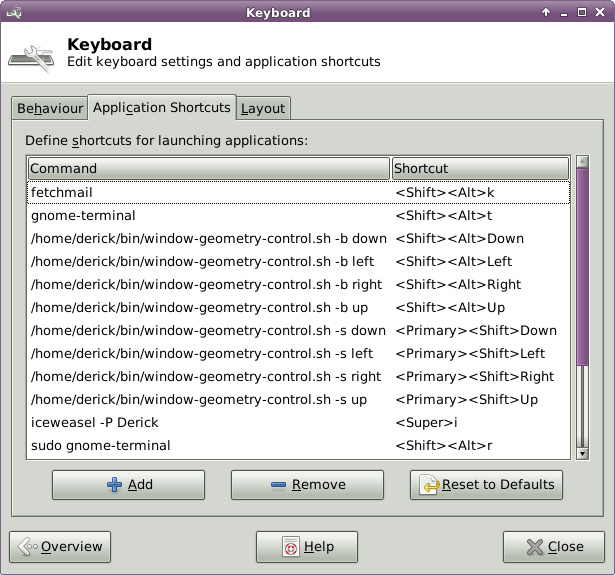
The screenshot above shows those assigned keyboard shortcuts. I've put the modified script on github. As you can see I hardcoded the width and height of my own screen in it. Feel free to make this dynamic and send a pull request.

Comments
I am quite happy with Fedora's XFCE spin on my desktop (inside a virtual machine). For now I can live with GNOME 3 on my laptop but as soon as I will have some spare time I will replace it there with XFCE as well, I think.
I switched to XFCE recently as well, and will definitely try out these scripts. I have a widescreen monitor as my second monitor so I'll need to figure out a way of doing "middle" as well since I usually have two windows side-by-side on there, but fullscreen on my laptop screen.
Thanks for sharing, this will be a huge help to me :)
@LornaJane: I think I'll be extending on it a little bit soon, as there are still a few things that I can't do (such as: go back to original size). Expect an update!
Thanks for the pointers. I greatly simplified my own implementation to do the bare minimum, and it's quite snappy. I made 5 separate scripts. You'll need to tweak the "magic constants" of 1920x1200, 24, and 2 to reflect your own resolution, vertical window manager chrome, and horizontal chrome, respectively.
move-up:
#!/bin/sh

wmctrl -r :ACTIVE: -e 0,-1,0,-1,-1
move-left:
#!/bin/sh

wmctrl -r :ACTIVE: -e 0,0,-1,-1,-1
move-down:
#!/bin/bash

winid=`xprop -root _NET_ACTIVE_WINDOW | sed 's/^.*# \(0x[^,]*\),.*$/\1/'`
height=$((24 + `xwininfo -stats -id $winid | sed -n 's/^  Height: \([0-9]\+\)$/\1/p'`))
wmctrl -r :ACTIVE: -e 0,-1,$((1200 - $height)),-1,-1
move-right:
#!/bin/bash

winid=`xprop -root _NET_ACTIVE_WINDOW | sed 's/^.*# \(0x[^,]*\),.*$/\1/'`
width=$((2 + `xwininfo -stats -id $winid | sed -n 's/^  Width: \([0-9]\+\)$/\1/p'`))
wmctrl -r :ACTIVE: -e 0,$((1920 - $width)),-1,-1,-1
move-middle:
#!/bin/bash

winid=`xprop -root _NET_ACTIVE_WINDOW | sed 's/^.*# \(0x[^,]*\),.*$/\1/'`
width=$((2 + `xwininfo -stats -id $winid | sed -n 's/^  Width: \([0-9]\+\)$/\1/p'`))
height=$((24 + `xwininfo -stats -id $winid | sed -n 's/^  Height: \([0-9]\+\)$/\1/p'`))
wmctrl -r :ACTIVE: -e 0,$((960 - $width / 2)),$((600 - $height / 2)),-1,-1
Hope that helps you out!
Thanks so much for the information Derick and Brandon. I finally can manage my windows from keyboard in a comfortable way.


Life Line
Updated a cafe
Specify street/place names to addresses
Specify bicycle parking capacities
Specify bicycle parking fees
Specify bicycle parking access
Specify whether crosswalks have tactile paving
Specify width of opening
Specify whether pitches are lit
Specify pitch surfaces
Specify whether pedestrian crossings have markings
Specify step counts
Survey tactile paving on steps
Specify whether steps have a ramp
Specify which way leads up for steps
Specify whether pedestrian crossings have islands
Specify whether pedestrian crossings have traffic signals
Determine roads lane count
Specify whether roads have lane markings
Survey if places still exist
Specify whether roads have sidewalks
Survey postbox collection times
Survey opening hours
Determine whether ATM allows depositing cash
Specify bicycle parkings covers

Shortlink
This article has a short URL available: https://drck.me/xfcekeyb-8ug