
Wireshark and SSL
This is a follow up post to Wireshark and MongoDB 3.6, in which I explained how I added support for MongoDB's OP_MSG and OP_COMPRESSED message formats to Wireshark.
In the conclusion of that first article, I alluded to the complications with inspecting SSL traffic in Wireshark, which I hope to cover in this post. It is common to enable SSL when talking to MongoDB, especially if the server communicates over a public network. When a connection is encrypted with SSL, it is impossible to dissect the MongoDB Wire Protocol data that is exchanged between client and server—unless a trick is employed to first decrypt that data.
Fortunately, Wireshark allows dissection and analysis of encrypted connections in two different ways. Firstly, you can configure Wireshark with the private keys used to encrypt the connection, and secondly, you can provide Wireshark with pre-master keys obtained from a client process that uses OpenSSL.
The first option, providing Wireshark with the private keys, is by far the easiest. You can go to Edit → Preferences → Protocols → SSL and add the private key to the RSA keys list:
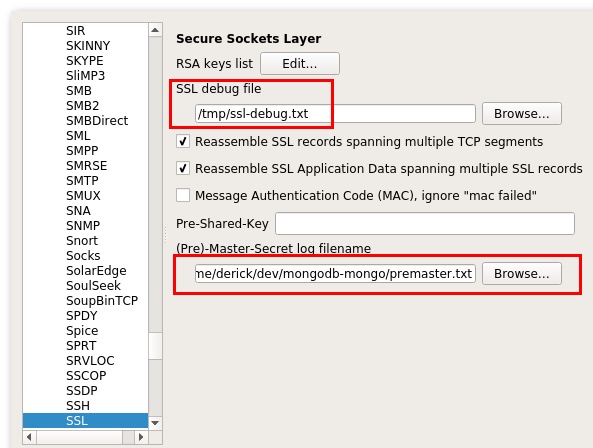
When you start using Wireshark with SSL encryption, it is also wise to configure an SSL debug file in the same screen. I have set it here to /tmp/ssl-debug.txt.
Months ago, I had added my private key to the RSA keys list, but when I tried it now for this post, Wireshark failed to decrypt my SSL traffic to MongoDB. I was a little confused as it worked in the past. Since I had my SSL debug file at least I had some chance of figuring out why this no longer worked. After a quick look I noticed the following in the debug file:
ssl_decrypt_pre_master_secret:
   session uses Diffie-Hellman key exchange
   (cipher suite 0xC030 TLS_ECDHE_RSA_WITH_AES_256_GCM_SHA384)
   and cannot be decrypted using a RSA private key file.
After some searching, I found out that if the session uses Diffie-Hellman for key exchange, Wireshark can not use the RSA private key, and needs different information. On an earlier run, I must have used a different version of either the encryption library (OpenSSL) or MongoDB, which did not use Diffie-Hellman.
This brings me to the second way of providing Wireshark with the information it needs to decrypt SSL encrypted connections: the pre-master key. This key is created during the connection set-up, and therefore you need to read data structures from within the OpenSSL library. You can do that manually with GDB, but it is also possible to inject a special library that hooks into OpenSSL symbols to read the data for you, and store them in a file with a format that Wireshark understands. You can find the source code for the library here.
Once you've obtained the source code, you can compile it with:
cc sslkeylog.c -shared -o libsslkeylog.so -fPIC -ldl
The compiled key logging library can be loaded in the process to override the existing OpenSSL symbols with:
SSLKEYLOGFILE=/tmp/premaster.txt LD_PRELOAD=./libsslkeylog.so \
    ./mongo --ssl \
    --sslPEMKeyFile=/tmp/ssl/ssl/client.pem --sslCAFile=/tmp/ssl/ssl/ca.pem
The OpenSSL LD_PRELOAD trick should also work with the PHP driver for MongoDB as long as it uses OpenSSL. You can verify which SSL library the PHP driver uses by looking at phpinfo() output. For Java programs, there is an agent you can use instead.
With the key logging library and its generated file with pre-master keys in place, and Wireshark configured to read the keys from this file through the (Pre)-Master-Secret log filename setting, we can now decrypt SSL-encrypted connections between MongoDB client and server:
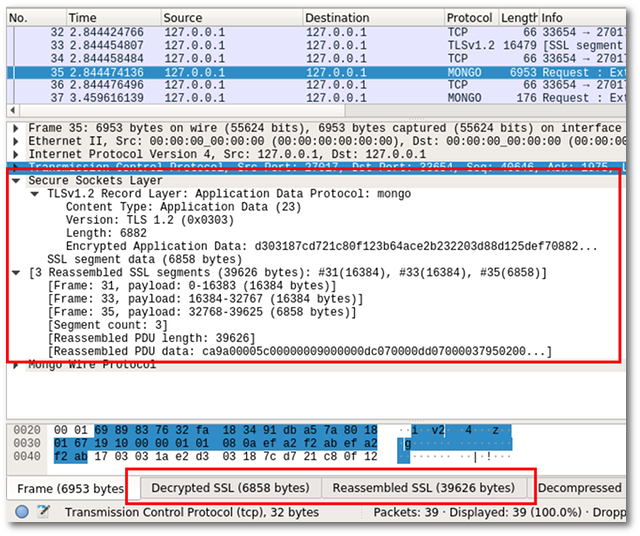
There was one caveat: a small patch to Wireshark is needed for it to realise that MongoDB's connections can be SSL encrypted on the default port (27017). I created a patch with the following one-liner:
  proto_reg_handoff_mongo(void)
  {
      dissector_add_uint_with_preference("tcp.port", TCP_PORT_MONGO, mongo_handle);
+     ssl_dissector_add(TCP_PORT_MONGO, mongo_handle);
  }
This patch, and the two patches mentioned in the previous post, have been merged into Wireshark's master branch and will be included in the upcoming 2.6 release. Until that is released, you will have to compile Wireshark yourself, or use a nightly build.


Life Line
Updated a cafe
Specify street/place names to addresses
Specify bicycle parking capacities
Specify bicycle parking fees
Specify bicycle parking access
Specify whether crosswalks have tactile paving
Specify width of opening
Specify whether pitches are lit
Specify pitch surfaces
Specify whether pedestrian crossings have markings
Specify step counts
Survey tactile paving on steps
Specify whether steps have a ramp
Specify which way leads up for steps
Specify whether pedestrian crossings have islands
Specify whether pedestrian crossings have traffic signals
Determine roads lane count
Specify whether roads have lane markings
Survey if places still exist
Specify whether roads have sidewalks
Survey postbox collection times
Survey opening hours
Determine whether ATM allows depositing cash
Specify bicycle parkings covers
Shortlink
This article has a short URL available: https://drck.me/wireshark-ssl-dxq