
Tweaking the Logitech R400 presenter tool on Linux
This article is outdated, please refer to a new version.
Updated on April 9th, 2013, after comments by Jim Diamond
For Christmas I received a Logitech R400 presenter tool as a replacement for the php|architect one that has now fallen apart. However, to use it together with my presentation system—pres2, about which I previously wrote—I need it to provide left and right arrow keypresses. By default its left and right buttons generate Prior and Next events in X.
It took me a while to get this to work, so in short, this is how I changed it. First of all, I created the file /etc/udev/logitech-r400 as root with contents:
0x70037 f5
0x70029 f11
0x7003E f11
0x7004B left
0x7004E right
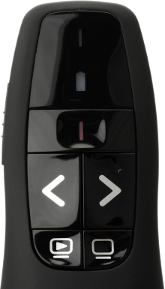
This maps the two scan codes that the Play button (lower-left) both to f11, the empty screen button to f5 and the left and right buttons to the left and right arrow keys.
The first column represents the scancode, which I obtained by first looking up with input event the device was tied to:
stat -t /dev/input/by-id/usb-Logitech_USB_Receiver-event-kbd --printf "%N\n"
Which showed the following for me:
‘/dev/input/by-id/usb-Logitech_USB_Receiver-event-kbd’ -> ‘../event16’
Then with event16 I ran:
/lib/udev/keymap -i input/event16
And pressed all four buttons (and the Play button twice). This then showed up on the screen:
scan code: 0x7004B   key code: pageup
scan code: 0x7004E   key code: pagedown
scan code: 0x7003E   key code: f5
scan code: 0x70029   key code: esc
scan code: 0x70037   key code: dot
After creating the file, to test things I ran:
sudo /lib/udev/keymap input/event16 /etc/udev/logitech-r400
Which showed:
Remapped scancode 0x70037 to 0x3f (prior: 0x34)
Remapped scancode 0x70029 to 0x57 (prior: 0x01)
Remapped scancode 0x7003e to 0x57 (prior: 0x3f)
Remapped scancode 0x7004b to 0x69 (prior: 0x68)
Remapped scancode 0x7004e to 0x6a (prior: 0x6d)
After this ran, the presenter tool now sends the key presses that I want. To make this permanent, I added as root a new file /etc/udev/rules.d/logitech.rules, with as contents:
ENV{ID_VENDOR}=="Logitech*", ATTRS{idProduct}=="c52d", RUN+="keymap $name /etc/udev/logitech-r400"
The changes will now also persist after rebooting as well.
My first possibility to test the new tool will be at PHP Benelux where I will be giving a MongoDB tutorial on January 25th. Tickets are still available.

Comments
Very nice and useful. Thanks!
In new Ubuntu (13.10 or 14.04) this way have changed.
Now, you must edit the file: /lib/udev/hwdb.d/60-keyboard.hwdb
- Find for "Logitech Presenter R400" and change this lines:
-
KEYBOARD_KEY_070029=esc KEYBOARD_KEY_07003e=f5
Example:
- # Logitech Presenter R400 keyboard:usb:v046DpC52Dd*dc*dsc*dp*ic*isc*ip*in00*
-
KEYBOARD_KEY_070029=esc KEYBOARD_KEY_07003e=f5 KEYBOARD_KEY_070037=displaytoggle
After that, run this command: # udevadm hwdb --update
Now reboot you computer. And that's it!


Life Line
Updated a cafe
Specify street/place names to addresses
Specify bicycle parking capacities
Specify bicycle parking fees
Specify bicycle parking access
Specify whether crosswalks have tactile paving
Specify width of opening
Specify whether pitches are lit
Specify pitch surfaces
Specify whether pedestrian crossings have markings
Specify step counts
Survey tactile paving on steps
Specify whether steps have a ramp
Specify which way leads up for steps
Specify whether pedestrian crossings have islands
Specify whether pedestrian crossings have traffic signals
Determine roads lane count
Specify whether roads have lane markings
Survey if places still exist
Specify whether roads have sidewalks
Survey postbox collection times
Survey opening hours
Determine whether ATM allows depositing cash
Specify bicycle parkings covers
Shortlink
This article has a short URL available: https://drck.me/r400-a1r